Most "best HubSpot apps" lists are just the ones with the most installs. That tells you what people click, not what they keep using. So I did something different: I took the most popular apps on the HubSpot App Marketplace and pulled the real customer rating for each one.
The results surprised me. Plenty of the big-name apps everyone installs sit at 3 out of 5 or lower. A handful of quieter tools are the ones people genuinely rate. Below are 20 worth knowing about, grouped by the job they do, each with its HubSpot Marketplace rating (out of 5), a plain description of what it does, and the problem it solves for a small business.
A quick note on the ratings before you read on: I checked these in August 2026, and only two of the twenty scored 4.5 or above. A rating is a signal, not a verdict. A 3.8 app that fits your setup beats a 4.6 app you never switch on. What matters is whether the tool gets used once it is properly implemented, which is the part I help with here in Perth.
Calls, Meetings and AI Notetakers
If your business runs on conversations, this is where the quiet wins are. These tools capture what was said and get it into your CRM without anyone typing it up.
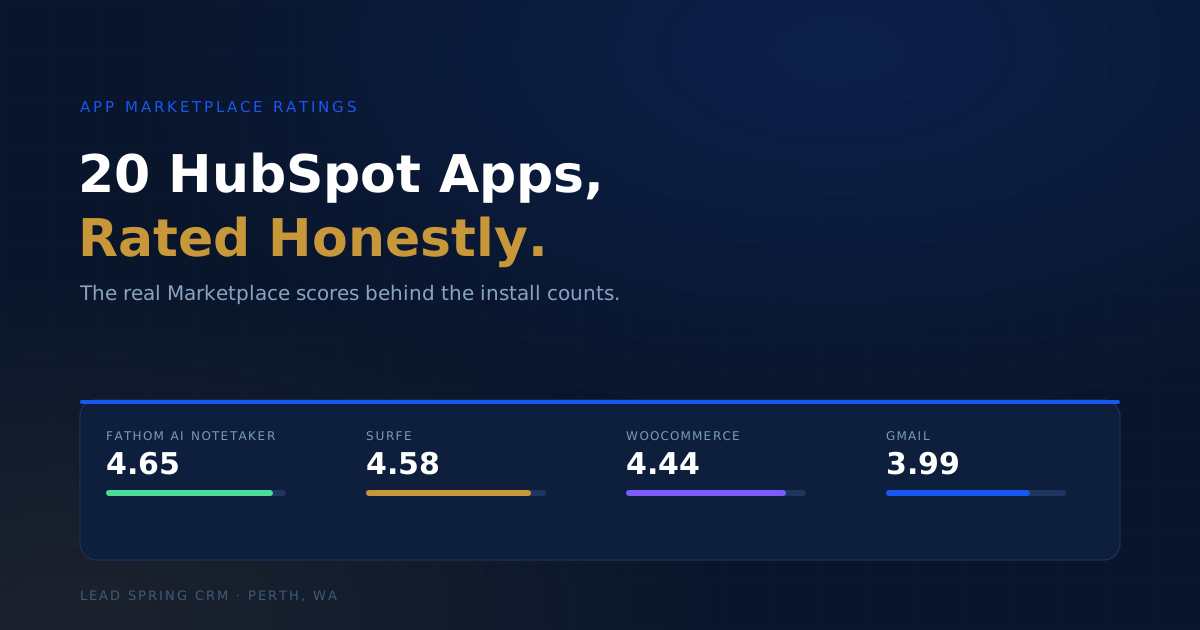
Fathom AI Notetaker — rated 4.65 (452 reviews)
Fathom joins your video calls, records and transcribes them, then writes a summary with action items and syncs it straight into HubSpot.
The problem it solves: you finish a good call, then lose half of it. Follow-ups slip, the CRM never gets updated, and the next person to touch that deal has no idea what was promised. Fathom means the record writes itself. It is the highest-rated app in this whole list, and it is easy to see why.
Aircall: AI-Powered Calling and SMS — rated 4.29 (320 reviews)
Aircall is a cloud phone system that logs every call and text against the right HubSpot contact, with click-to-call and recording built in.
The problem it solves: phone calls that happen completely outside your CRM. If sales rings a lead and nothing gets logged, that conversation may as well not have happened. Aircall keeps the phone and the CRM in one place.
Fireflies.ai Call Transcripts — rated 3.98 (89 reviews)
Fireflies records, transcribes and makes your meetings searchable, then logs the notes back to HubSpot.
The problem it solves: the "what exactly did we agree?" moment three weeks later. Instead of guessing, you search the transcript. Useful if your team runs a lot of calls and needs a paper trail.
Meetings and Team Communication
The tools your team already lives in. The value here is making sure important CRM activity does not get stranded inside them.
Google Meet — rated 4.06 (433 reviews)
The integration drops meeting links, recordings and transcripts into HubSpot so a call is attached to the contact it belongs to.
The problem it solves: meetings that leave no trace in the CRM. Good for teams that book calls all day and want the record without extra admin.
Slack — rated 3.74 (249 reviews)
Slack is where a lot of small teams actually work. The HubSpot integration pushes deal alerts, form submissions and notifications into your channels, and lets you create tasks without leaving Slack.
The problem it solves: things falling through the cracks because your team lives in Slack and only checks HubSpot when they remember to. Bring the alerts to them.
Sales Prospecting and Lead Data
Getting good contacts into the CRM is half the battle. These two attack the data-entry and research grind.
Surfe — rated 4.58 (139 reviews)
Surfe adds people from LinkedIn into HubSpot in one click and keeps the conversation synced, so prospecting on LinkedIn actually feeds your pipeline.
The problem it solves: the copy-paste tax. Reps find great prospects on LinkedIn, then never get around to entering them properly. Surfe removes that step entirely. It is the second highest-rated app on the list.
Clay — rated 3.82 (17 reviews)
Clay pulls contact and company data from a large range of sources, enriches your records, and can push the results into HubSpot.
The problem it solves: a CRM full of half-filled, out-of-date records. Rather than paying someone to research leads by hand, Clay fills the gaps. Worth a look if your data is the thing holding your outreach back.
Automation and Integrations
This is where I spend a lot of my time. These tools connect HubSpot to everything else you run, so repetitive tasks stop eating your week. Both let you build serious automation without hiring anyone new.
n8n.cloud — rated 4.19 (36 reviews)
n8n is a flexible automation builder that connects HubSpot to your other apps with custom, multi-step flows.
The problem it solves: the same manual task, over and over, because two systems will not talk to each other. n8n is a favourite when you want control and something a bit more technical than the off-the-shelf connectors.
Make — rated 4.01 (217 reviews)
Make is a visual, no-code automation builder that links HubSpot to thousands of other apps by dragging boxes and drawing lines.
The problem it solves: the gap between the tools you use and the time you have. If you can describe the process, you can usually build it in Make. A strong starting point for time-poor business owners who want automation without writing code.
Email, Contacts and Scheduling
The daily admin. None of these are exciting, and all of them save you time every single day once they are set up properly.
Google Contacts — rated 4.04 (311 reviews)
Two-way sync between Google Contacts and HubSpot, so a number saved on your phone shows up in the CRM and vice versa.
The problem it solves: two address books that never match. Everyone stops trusting the CRM the moment it disagrees with their phone.
Google Calendar — rated 4.03 (reviews not shown)
Two-way calendar sync so meetings booked anywhere land in HubSpot, and vice versa.
The problem it solves: double-booking, and meetings that never get logged against the contact. Basic, essential, and the sort of thing that quietly breaks reporting when it is missing.
Gmail — rated 3.99 (3,417 reviews)
HubSpot's Gmail integration tracks your emails, gives you templates, logs the thread to the CRM, and lets you run follow-up sequences straight from your inbox.
The problem it solves: email being the black hole of your customer history. If the conversation is not in the CRM, nobody else on the team can pick it up. This is one of the most-installed apps on the whole marketplace, though the 3.99 rating tells you the experience is not flawless.
Calendly — rated 3.62 (189 reviews)
Calendly lets prospects book time with you from a link, and the integration creates or updates the matching HubSpot record.
The problem it solves: the email tennis of finding a time. Send a link, they pick a slot, the record updates itself. Cuts no-shows too when you add reminders.
Forms, Documents and Getting Paid
Capturing the lead and closing the deal. These two sit at either end of that journey.
PandaDoc | eSign, CPQ, Payments — rated 4.34 (304 reviews)
PandaDoc builds proposals, quotes and contracts, collects e-signatures, and can pull the details straight from a HubSpot deal.
The problem it solves: slow, manual quoting and the endless chase for a signature. Generate the document from data you already hold, send it, get it signed, and watch the deal move. One of the better-rated tools here.
Jotform — rated 3.66 (86 reviews)
Jotform builds online forms that push submissions directly into HubSpot.
The problem it solves: leads that fill in a form and then vanish because the entry never reached the CRM. If HubSpot's native forms do not do what you need, Jotform is a common backup.
Website and Ecommerce
Your website should be your best salesperson. These make sure it actually feeds the CRM instead of sitting on its own.
WooCommerce by MakeWebBetter — rated 4.44 (159 reviews)
This syncs your WooCommerce store, customers, orders and products, into HubSpot so you can market to buyers based on what they actually did.
The problem it solves: a store that is completely separate from your marketing. No abandoned-cart follow-up, no repeat-purchase campaigns, no idea who your best customers are. This connects the two and rates well for it.
HubSpot for WordPress — rated 3.92 (409 reviews)
Puts HubSpot forms, live chat, pop-ups and analytics onto a WordPress site.
The problem it solves: a WordPress site that looks fine but captures nothing. If your leads are not making it from the site into the CRM, you are paying for traffic and losing it at the door.
Reporting and Insight
You cannot fix what you cannot see. These pull your numbers together so you know what is working.
Databox — rated 4.31 (58 reviews)
Databox pulls HubSpot and your other tools into one set of dashboards, so your KPIs live in a single view.
The problem it solves: reporting scattered across five tabs. Instead of stitching numbers together by hand every Monday, you get one screen that updates itself. Well rated and genuinely useful once it is set up around the metrics you care about.
Hotjar — rated 3.92 (12 reviews)
Hotjar shows heatmaps and session recordings of how people use your site, and ties that behaviour back to HubSpot contacts.
The problem it solves: knowing people leave your page but not why. Watching real sessions usually answers the question faster than any amount of guessing.
Google Data Connector — rated 3.50 (54 reviews)
This brings Google Ads data into HubSpot so your ad spend sits next to your CRM outcomes.
The problem it solves: spending on ads with no clear line to actual sales. If you cannot see which campaigns create customers, you are optimising blind. The lowest rating in this group, so worth testing against your own needs before you commit.
Where I Would Start
If I am being honest, the app is rarely the hard part. The hard part is getting it set up so your team actually uses it, and connecting it to the rest of your systems so the data flows on its own. A 4.6 app installed and forgotten does nothing. A 3.7 app that runs quietly in the background every day can save you 5+ hours a week.
That is the work I do here in Perth: picking the right tools for how your business actually runs, then implementing them so they stick. If you are staring at a HubSpot setup that half-works and a marketplace full of apps you are not sure about, I can help you sort the useful from the noise.
Book a Free Call and I will take a look at your setup.